

Business Financial Statements Guide for Small Businesses
Nearly 60 percent of American small business owners admit they find financial record keeping confusing. With so many numbers, statements, and software options, it is easy to see why most feel lost at the start. Knowing which financial documents to gather and how to set up your records can shape the future of your business. This guide shows clear, practical steps that put you in control of your American company’s finances right from day one.
Table of Contents
- Step 1: Gather Essential Business Financial Documents
- Step 2: Set Up QuickBooks Online Accounts Accurately
- Step 3: Categorize All Transactions For Clarity
- Step 4: Reconcile Bank Accounts To Ensure Accuracy
- Step 5: Generate And Review Key Financial Statements
Quick Summary
| Key Takeaway | Explanation |
|---|---|
| 1. Gather crucial financial documents | Collect your income statement, balance sheet, cash flow statement, and budget report to understand financial health. |
| 2. Set up QuickBooks Online correctly | Configure a detailed chart of accounts and invoice templates to ensure accurate financial tracking. |
| 3. Categorize transactions systematically | Organize and manually verify transactions to enhance financial clarity and improve reporting accuracy. |
| 4. Reconcile bank accounts monthly | Compare recorded transactions with bank statements monthly to identify and correct discrepancies early. |
| 5. Generate and analyze financial statements | Regularly review your financial statements to detect trends and inform strategic financial decision-making. |
Step 1: Gather essential business financial documents
Preparing your business financial documents is a critical first step in understanding your company’s financial health. The process involves collecting key records that provide a comprehensive view of your business performance and financial standing.
Start by assembling the most important financial documents recommended by business experts. These typically include your income statement, balance sheet, cash flow statement, accounts receivable aging report, and budget report. Each document serves a unique purpose in tracking your business finances. The income statement reveals your revenue and expenses, showing whether you’re generating a profit. The balance sheet provides a snapshot of your assets, liabilities, and owner’s equity at a specific point in time. Your cash flow statement tracks money moving in and out of the business, helping you understand your liquidity.
When gathering these documents, organization is key. Create a dedicated digital folder or physical filing system where you can store these records systematically. Keep both digital and physical copies for backup, and ensure all documents are current and accurately reflect your business transactions. Pro tip: Establish a monthly routine for collecting and reviewing these financial statements to stay on top of your business financial health. This proactive approach will make tax preparation easier and provide valuable insights for strategic decision making.
The next step will involve carefully reviewing and analyzing these documents to gain a deeper understanding of your business financial performance.
Step 2: Set up QuickBooks Online accounts accurately
Setting up your QuickBooks Online accounts accurately is a foundational step in maintaining precise financial records for your small business. This process requires careful attention to detail and strategic organization of your financial information.
Begin by configuring a comprehensive chart of accounts that reflects your specific business structure and financial categories. This means creating account categories that match your unique business operations such as revenue streams, expense types, assets, and liabilities. Enable account numbers to help with easier tracking and reporting. When connecting your bank and credit card accounts, ensure you select the correct account types and match transactions precisely. QuickBooks Online allows automatic transaction importing, but you will want to review and categorize each transaction manually to maintain accuracy.
Pay special attention to your invoice templates and customization options. Set up professional templates that include your business logo, standard payment terms, and clear itemization. Create multiple templates if you serve different types of clients or offer varied services. A pro tip is to establish default tax rates and standard items in your inventory to streamline future invoicing. By investing time in setting up your QuickBooks Online accounts meticulously now, you will save countless hours of reconciliation and potential errors later. The next step involves understanding how to consistently maintain and review these financial records to keep your business insights sharp and reliable.
Step 3: Categorize all transactions for clarity
Categorizing your business transactions is a critical process that transforms raw financial data into meaningful insights about your company’s financial performance. This step requires systematic organization and consistent attention to detail.

Effective transaction categorization helps you track spending, monitor cash flow, and prepare accurate financial reports. Start by establishing clear, consistent naming conventions for each transaction category. Group expenses into logical buckets such as office supplies, marketing costs, equipment purchases, and professional services. Use your accounting software’s built-in features to create custom categories that match your specific business model. When importing transactions, manually review and confirm each entry to ensure it falls into the correct category. This might seem time consuming initially, but it will save you significant effort during tax preparation and financial analysis.
Make your categorization process as automated and streamlined as possible. Set up rules in your accounting software that automatically assign categories based on vendor names or transaction types. Develop a standard process for handling unusual or infrequent expenses, creating a clear protocol for your team. By maintaining meticulous transaction records, you create a reliable financial roadmap that helps you understand your business spending patterns, identify potential cost-saving opportunities, and make informed strategic decisions. The next step will involve reconciling these categorized transactions to ensure complete accuracy in your financial records.
Step 4: Reconcile bank accounts to ensure accuracy
Reconciling your bank accounts is a critical financial management process that helps you verify the accuracy of your financial records and catch any discrepancies before they become significant issues. This step ensures that your business’s recorded transactions match exactly with your bank statement.
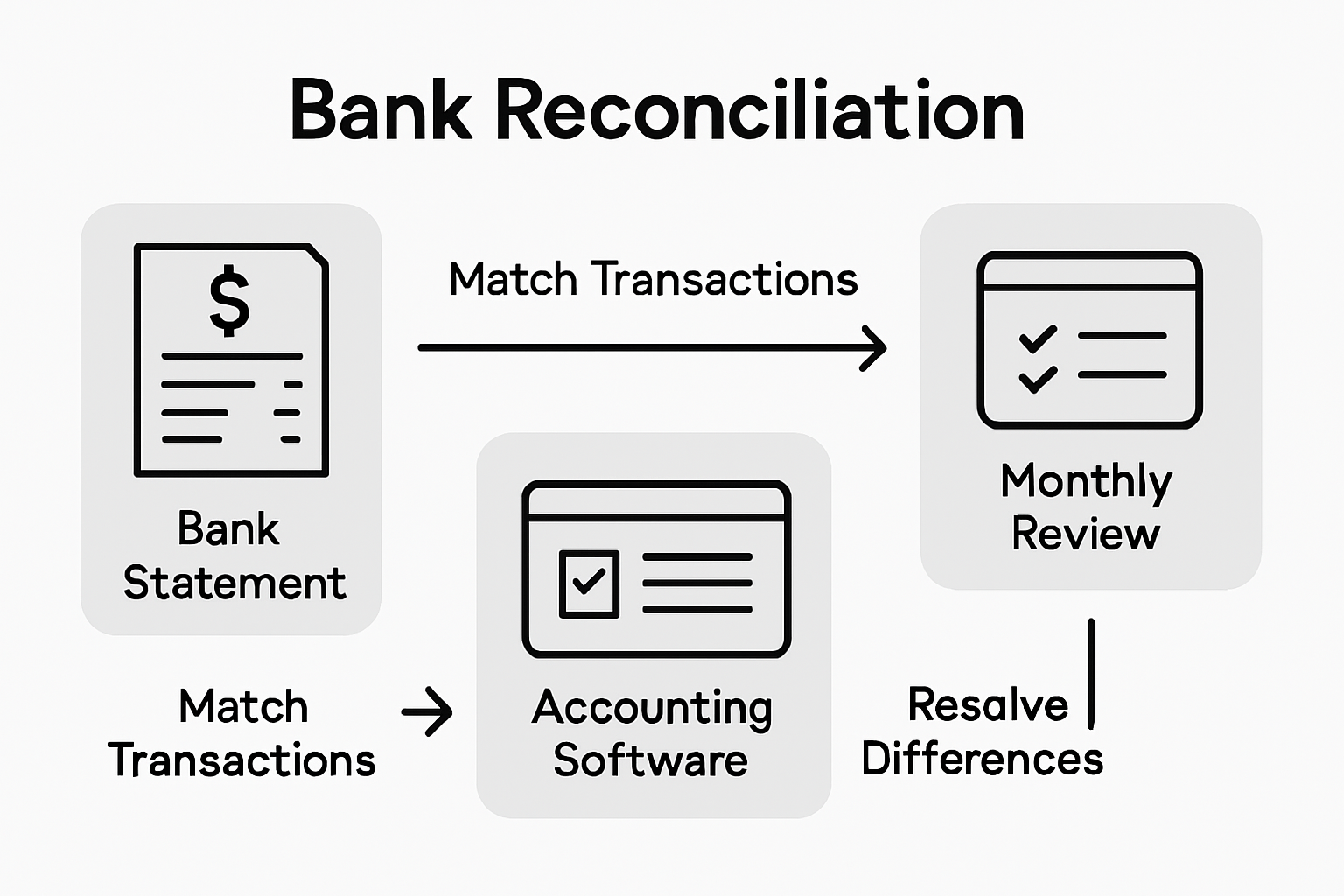
Connecting your bank accounts automatically through QuickBooks Online streamlines the reconciliation process by downloading transactions directly from your bank. Begin by comparing each transaction in your accounting software with your official bank statement, checking that every deposit, withdrawal, and transaction is accurately recorded. Look for any differences such as missed transactions, duplicate entries, or incorrect amounts. Pay close attention to bank fees, interest charges, and automatic payments that might not have been manually entered. A pro tip is to reconcile your accounts monthly, which helps you catch and correct errors quickly and maintains the integrity of your financial records.
Develop a systematic approach to reconciliation by setting aside dedicated time each month to review your accounts thoroughly. Create a checklist that includes verifying transaction dates, amounts, and categories. If you discover any discrepancies, investigate them immediately and make necessary adjustments in your accounting software. By maintaining meticulous and consistent bank reconciliation practices, you create a solid foundation for financial transparency and accurate reporting. The next step involves analyzing your financial statements to gain deeper insights into your business performance.
Step 5: Generate and review key financial statements
Generating and reviewing key financial statements is the cornerstone of understanding your business’s financial performance and making strategic decisions. This critical process transforms your raw financial data into meaningful insights that reveal your company’s financial health.
Comprehensive financial statement analysis involves creating three primary documents: the income statement, balance sheet, and cash flow statement. Start by running these reports in your accounting software, ensuring you select the appropriate date range that matches your review period. The income statement will show your revenue, expenses, and net profit, helping you understand your business profitability. Your balance sheet provides a snapshot of your assets, liabilities, and equity at a specific point in time. The cash flow statement tracks how money moves in and out of your business, revealing your liquidity and ability to cover expenses.
When reviewing these statements, look beyond the numbers to understand the story they tell about your business. Compare current statements with previous periods to identify trends, unusual fluctuations, or potential areas for improvement. Pay attention to key performance indicators such as gross profit margin, net profit margin, and operating expenses ratio. A pro tip is to create a consistent monthly or quarterly review schedule, allowing you to spot patterns and make proactive financial decisions. By regularly generating and critically analyzing your financial statements, you transform complex financial data into actionable business intelligence. The next step involves using these insights to develop strategic financial planning for your business.
Take Control of Your Small Business Finances with Expert Bookkeeping Support
Understanding and managing your business financial statements can feel overwhelming. The article highlights the challenges of gathering accurate documents, setting up QuickBooks Online properly, categorizing transactions, and performing bank reconciliations to ensure your financial records are clear and error-free. If you struggle with these steps or want to turn complex reports into actionable insights, you are not alone. Many small business owners experience stress and uncertainty when trying to maintain detailed financial health without dedicated help.
At Kenworthy Bookkeeping, we specialize in making bookkeeping effortless for small businesses in Kansas City. Our expert team handles everything from precise transaction categorization to thorough bank reconciliations and generating reliable profit and loss statements. We use QuickBooks Online to streamline your finances so you can focus on growing your business with confidence. Do not wait until tax season pressures build or financial confusion clouds your decisions. Visit Consulting Services to learn how we provide trusted bookkeeping solutions tailored to your needs.

Get the clear financial transparency you deserve today. Schedule a consultation at Kenworthy Bookkeeping and gain control of your business finances with professional care and accuracy. Your business’s future depends on smart, up-to-date financial management. Take the first step now.
Frequently Asked Questions
What are the key financial statements every small business should prepare?
The key financial statements include the income statement, balance sheet, and cash flow statement. Prepare these documents to understand your business’s revenue, expenses, assets, liabilities, and overall financial health.
How often should I review my business financial statements?
You should review your business financial statements at least monthly. This regular schedule allows you to identify trends and make informed decisions about your business’s financial performance.
What steps should I take to categorize my business transactions?
To categorize your business transactions, start by establishing clear categories for expenses, such as office supplies and marketing costs. Then, manually review and assign each transaction to the appropriate category in your accounting software for clarity and accuracy.
How can I reconcile my bank accounts effectively?
Reconcile your bank accounts by comparing transactions in your accounting software to your bank statement monthly. Create a checklist to verify dates, amounts, and categories, and address any discrepancies right away.
Why is it important to generate financial statements for my small business?
Generating financial statements is crucial for understanding your business’s financial health. These documents reveal profitability, track cash flow, and inform strategic decisions based on financial data and trends over time.
What should I do if I find discrepancies in my financial statements?
If you find discrepancies in your financial statements, investigate immediately and correct the errors in your accounting records. Take detailed notes on what was discovered to prevent similar issues in the future.
Recommended
- Small Business Accounting: Streamlining Your Kansas City Finances – Kenworthy Bookkeeping Blog
- Role of Bookkeeping for Small Business Success – Kenworthy Bookkeeping Blog
- Kenworthy Bookkeeping Blog
- Role of a Bookkeeper: Impact on Kansas City Small Businesses – Kenworthy Bookkeeping Blog
- Tech for Small Businesses: Complete Guide for 2025 – Projector Display
- Why Print for Small Business: Complete Guide – www.printcafeusa.com





4 Comments
Comments are closed.